SEO in 2017, Digital Home Assistants, Mobile Indexing, and AI - Oh My!

SEO in 2017, Digital Home Assistants, Mobile Indexing, and AI - Oh My!
Looking to discover a new SEO strategy that will help optimize your site? Have you taken into consideration how digital assistants and apps have changed the way buyers operate? If you haven’t already approached your boss with a model about how to adapted to these changes it might be too late.

As the rise of digital assistants like Siri and Amazon Echo become smartphone staples and home automation ports, it's important to recognize that changing your SEO methods is no longer an option. 180Fusion is a leading search engine marketing company that specializes in generating leading SEO terms and site optimization. We sat down with them, to help loop together what it is you need to understand about the ever-changing strategy of SEO content while catering to the world of artificial intelligence and mobile.

Here are three approaches to SEO that will better position you in a world conforming to assistant search:

Hey Google, Alexa and Siri: Optimizing For Digital Assistants

The number of consumers turning to digital assistants for answers to their questions is on the rise. Marketers will have to adapt if they want to stay relevant in a world where the use of personal operating systems and mobile apps for shopping becoming par for the course.

Digital assistants like Siri, Google Now, and Amazon echo are completely redefining the search and shop process. Rather than producing a run of results when they’re asked a question, they produce an immediate answer negating the duty of the user to filter through various options and stumbling across your website.

Your business should dodge becoming obsolete by playing the same game that these digital assistants relying on existing web search algorithms do. Because they use content that will supply them with sufficient and accurate answers, you should provide them with answers that are specific and significant.

As they are now, interactions with digital assistants are conversational, thus digital assistants seek out results that are conversational. Optimize your site's SEO by including colloquial terms, long-tail keywords, and detailed questions. Create posts that venture into niche territory. Be the source that a know-it-all digital assistant links to and your site your brand will score instant credibility points and increase user return.

Mobile First Is No Longer Optional

The amount of time people spend using their phones for searches is skyrocketing. Smartphones give people the luxury of instant access to information they had to drive home or to the office for. It’s why going mobile with your site isn’t an option anymore, especially because search engines like Google rewarding mobile-friendly sites with more positive rankings.

As you create and design content for your site, it becomes key that you reflect on how it is that you use and access the internet. Smartphones that have even more capabilities of a computer have changed the ways people want to receive information. Not only do they want instant access they want to have it fed to them easily. Secure visitors who access your site via mobile by presenting them with a site that is mobile responsive or designed to account for device screen size so that the site can be displayed on different screens. 180Fusion created a mobile responsive corporate website that detects the screen size of a device and accounts for its different dimensions. Use mobile SEO and optimization to provide a site designed and structured to run on a mobile at a page speed that won’t frustrate your user and turn them away. 

Do It All With Artificial Intelligence

The development and improvement of artificial intelligence means that we’ll have access to smarter and more human-friendly search engines. Results that come from a search take into account your location, the amount of clicks from similar queries and even your own search history. AI developments will allow for an adaptation in result rank as algorithms take in what prompts the most clicks and translate it into relevancy. This means a heightened importance of SEO optimization for marketers and the content that they create.

As search engines use artificial intelligence to improve analyzing search objectives, keyword research accuracy becomes more critical. Marketers have to hone in on keywords and then make them relevant to the content they create. Accordingly, frame of reference and content relevance are now more important factors than old methods that aimed to achieve keyword density.

Speaking of relevance, video content mustn’t be undervalued. Especially because search engines like Google have started to favor videos in search results. As they also improve upon detecting what visual content is about, the game for visual content creators completely changes. For them, considering SEO when creating visual content becomes crucial.

It might all sound intimidating, but improvements in AI will make SEO become a strategy that is more intelligible and regular. Focus on delivering valuable and suitable content to searchers and you’re already ahead of the game.

Productivity Tool Preview - Able2Extract Professional 11

The majority of our office documentation comes in PDF - the most known, universal format for viewing and storing documents. No matter the industry, profession or experience, everyone is still using it.

The PDF’s main trait is its non-editable nature. You cannot edit or change any content inside a PDF document, by default. Two reasons why:
  1. Security - PDF format is the most secure type currently available, thus you are unable to easily alter documents.
  2. Portability - PDF files tend to always keep the layout so they can be viewed and shared across devices and platforms.
Because you cannot copy or edit a PDF file, various companies develop software to help us solve that particular problem. One of those tools is Able2Extract, whose latest version is set to be released on December 5.

This brand new office productivity solution is called Able2Extract Professional 11 and we had the pleasure of reviewing it prior to its release.

Here is what you will have a chance to see in the latest build:

PDF Creation

Having in mind the latest document security concerns in almost all competitive industries, the developers of Able2Extract decided to up the ante and provide complete document encryption and decryption, upon PDF creation.

This means that you can set up document owners, configure passwords and share your documents securely. There are two ways to create PDFs in Able2Extract:
  1. After clicking the right-mouse-button on a supported file, select the "Print" option and choose Able2Extract Professional 11 printer.
  2. By clicking on a "Create" button in Able2Extract, the software will immediately make a PDF document from your desired file.
PDF compression is another sub-task, which allows you to set up image and text compression, therefore reducing file size for when you send it through email.

PDF Editing

Using Able2Extract’s upgraded PDF editing engine, you will have a chance to perform a wide variety of operations, most notably:
  • Add, remove and edit PDF text
  • Add images and vector shapes
  • Change text size, font color, fill and outline text blocks
  • Move and rotate all content blocks
  • Rearrange one or several pages
  • Combine multiple PDF files into one document
  • Split PDF documents
  • Rotate and delete pages across the document
  • Resize any individual page
Additionally, users can now redact (black out) all sensitive information from their financial and legal documents.

PDF Conversion

Able2Extract Pro 11 will keep the main strength of its predecessors. After all, this software is primarily a PDF conversion software. Version 11 is empowered with an improved OCR engine that enables you to convert scanned PDF documents into fully editable formats.

All conversions work the same: open your PDF by clicking on the "Open" button and selecting the desired file. Since Able2Extract is one of the most advanced converters out there, it supports conversion up to 12 different formats, such as:
  • PDF to Word
  • PDF to Excel
  • PDF to Image
  • PDF to CSV
  • PDF to PowerPoint
  • PDF to HTML
  • PDF to AutoCAD and more
As usual, users can use Custom conversion features to manually set up all needed parameters. Take note that the custom conversion is still limited to PDF to Excel and PDF to CSV.

PDF Annotations

In Able2Extract Pro 11 users do not need to install any plugins for annotations, as this new feature runs right inside the new Annotations Panel, which supports following annotations:
  • Sticky notes
  • Comments
  • Highlight
  • Underline and strikeout text
  • Stamps and watermarks
  • Hyperlink and attachment
Having in mind that this is just a quick preview, you can rest assured that the actual software provides even more productivity enhancing features, as these are just some of the new things you will get with Able2Extract 11. The tool is in many ways a useful product that can solve any PDF problems you might have.

A lifetime, single-user license will go for $129.95 and the software is available for Windows, Mac OS, and Linux users.

Wikipedia Becoming More Acceptable in the Classroom

Wikipedia Becoming More Acceptable in the Classroom
Wikipedia has been the go-to source for many people over the last decade. Despite it being considered non-reliable, it is still one of the first places people look due to its ranking so high in search results. Academia is one of the industries that have not had a good relationship with Wikipedia throughout the years but this could be changing thanks to recent trends.

Due to Wikipedia not being considered a reliable source, many colleges and universities have banned its use by students for research projects. However, the Los Angeles Times recently reported that some college professors are actually using Wikipedia for classes, something that would not have been allowed just a few years ago.

Even though academia has shunned Wikipedia in the past, there seems to be a growing trend to allow its use in schools. There are many reasons why this could be occurring but here are some of the most common.

Wikipedia Now Being Edited by Experts

 Wikipedia is no longer edited by a small group of editors. Many of them are experts in professional fields such as physicians, lawyers, and even professors. This pool of editors volunteers their time to make improvements to the site, editing existent content and creating new pages.

Wikipedia has become so difficult to navigate because of its vast rules that people even turn to professional Wikipedia services. That means you now have volunteer editors as well as outside paid editors contributing content to Wikipedia.

Editors Are Becoming More Diverse

A study by MIT found that Wikipedia is skewed toward technical, western, and male-dominated subject matter. This is reflective of the male-dominated editor pool. Over the last couple of years, Wikipedia has become more diverse thanks to “edit-a-thons” that have focused on removing gender bias from Wikipedia.

When you bring diversity into any situation, you will have more of an unbiased view. The same applies to Wikipedia. With editors of all genders, races, religions, etc., you will have more of a neutral point of view with articles, making them a more reliable and accurate account of history.

Students Now Editing Wikipedia as Class Assignments

Evidence that Wikipedia has become more acceptable in education can be seen in how many students are editing it as a class assignment. I am not talking about using it as a reference, but learning how and performing edits to the online encyclopedia for class credit.

Wikipedia has worked with the academic community for some time now, even creating Wikipedia projects to help teachers use it for assignments. Some of the most prominent universities even employ “Wikipedians in Residence” who work within the college to help students and teachers with Wikipedia.

Students Learning to Use Wikipedia the Right Way

Despite earning more respect in academia, it is still not advisable to cite Wikipedia for class assignments. This is due to the open access format where anyone can edit. Citing Wikipedia directly is a no-no but there is a way to use it as a starting point which many students are now taking advantage of.

According to the guide to using Wikipedia in academia, always go directly to the Wikipedia article about the topic you are researching. Then, scroll to the bottom under the “references” section. There you will find a list of all the reliable sources that you can use to cite in your paper. Students learning to use Wikipedia correctly are causing professors to trust its use more and more.

What Will be Next for Wikipedia and Academia?

I highly doubt that Wikipedia will ever be used as a direct citation for research. However, more educational institutions will likely move closer to allowing its use to begin your research. In addition to class projects where students edit Wikipedia directly, academia is likely to produce future Wikipedia editors from those who enjoyed using it for class projects.

What has been your experience with using Wikipedia in the classroom?

5 Smartphone Apps That Parents Need To Worry About

Owning a smartphone filled with countless apps that can help one from keeping track of their appointments to telling them how many calories they have lost by walking down the road is a norm these days. Yet, there are a few apps that parents should worry about as soon as they see them on their kids’ phones. Here are 5 of the worse apps your child could have on their phones.

Vine

Vine is home to some of the most popular online celebrities like King Bach who makes vine one of the most entertaining and fun social networking platforms out there. But like everything else, there are good ways to use vine and then there are the bad ones. The bad ones being the fact that one can upload any kind of pornographic material on vine without any restrictions. Now Hofmann, Yusupov and Kroll, the founders, incorporated a 17+ age restriction to make an account for vine, however, it is fairly simple for teens to make an account on vine.

Other than just viewing inappropriate videos on Vine, they can also upload their own videos which may or may not be indecent in nature and may even contain child abuse content.

ChatRoulette or Omegle

Same as other social networking apps on this list, ChatRoulette and Omegle allow teens to talk to strangers from all over the world. Now, these two apps are a mile ahead from other apps of its kind, providing video chatting facility, it is one of the most inappropriate apps for minors on the internet these days.

There are several features that the founders and the owners of these apps certainly overlooked. One being the fact that you can record the online video chats and upload them anywhere on the internet meaning that what your child says or does can most certainly come back to bite them in the near future. It also greatly increases the chances of cyber bullying. A large number of people just log into these apps to bully people and turn them against the people they love.

Ask.fm

Ask.fm allows access to a feature that is unlike any other, it enable its users to ask fellow members questions. Now these questions can very well be of any nature, there is no profanity filter of any sorts that prevents people from asking personal or sometimes sexual question from other people.

The questions aren’t reviewed by anyone so that it can be filtered before being published, that is the reason that abuse on ask.fm has been growing rapidly. If you fear that someone is bullying you online on ask.fm, it does come with the option to block people. However, the people you block can still view your profile and know about all your likes and dislikes and you can’t do anything about it.

Blendr

Blendr is an app which allows anyone to communicate with someone anywhere on the planet. However, it also incorporates a feature that uses the GPS Location of a device to find users located nearby. It’s never safe when strangers know your child’s location up to the block you live in. Even if we ignore the GPS Locating feature, it is also a pretty harmful app for the young minds because it allows online predators to prey on their minds and without anyone finding out about it.

Kik

This is another free texting app that enables children to talk to strangers, you don’t need to know anything about the other person, and you could just type in random names and hope for the best.

Other than the fact that you can search random people, there are also apps available on Google Play Store and the Apple Store that can provide usernames for males and females, whichever you may be interested in.

You don’t need to download the app to find out that it is mostly used to sexting, the app description and the comments on the app says it all. There are several hundred comments of people providing their private information and asking girls and boys for sexting and role play which makes it seems like a 100% hookup site.

The Bottom Line
           These are just 5 of the hundreds, even thousands of apps in the market that put the mind of children at great risk. The fact that kids can gain access to these apps as soon as they learn how to operate a smartphone is a cause of great worry for parents all over the world. The thrill of having explicit chats with strangers could very well be the only thing that could ruin the rest of their lives and get them addicted to stuff like pornography which very well leads to an act that the children might regret greatly in the future. Hence, using a smartphone monitoring app is the best precaution for parents in the world today.


Author Bio: 
Elizbeth is a blogger and writer. She loves to write about digital parenting teens and issues related them. She is currently working on monitoring you kid’s text messages to keep an eye on you kid. Follow her on twitter @elizbethsewell6

How New iOS Features Strike the Technology World


The introduction of IOS 10 has created much hustle and bustle among the update cravers. It has been successful so far. IOS has ignited the flare of innovation in almost every built-in application. The IOS App Development Company has marked its success when millions of users upgraded their IOS software and left beaming reviews telling how every feature has lightened up the interface.

Anyhow, keep reading as I am about to fill you up with something which surely going to amuse you. There are much more amazingly innovative features in IOS 10 along with those Apple announced, back in June. I have gathered the list of those features below. Scroll down and cast an eye over the awesomeness!

Interesting features in Message

Read-Receipt feature

Unlike IOS 9 the new IOS 10 also have read receipt feature. The feature, however, is upgraded with some new facilities. In IOS 10 you can select the individual friends and send them read-receipt. You are given a choice to select the desired one. The rest of your conversation follows the default setting. You can also turn off the feature whenever you want.

Read-Receipt feature

Inbuilt image search

IOS 10 gives a chance to chat with your friends using funny GIF. Now those days are gone when the only messenger was the source for GIF keyboard as IOS 10 also facilitates us with this newness.

Emoji and new effects

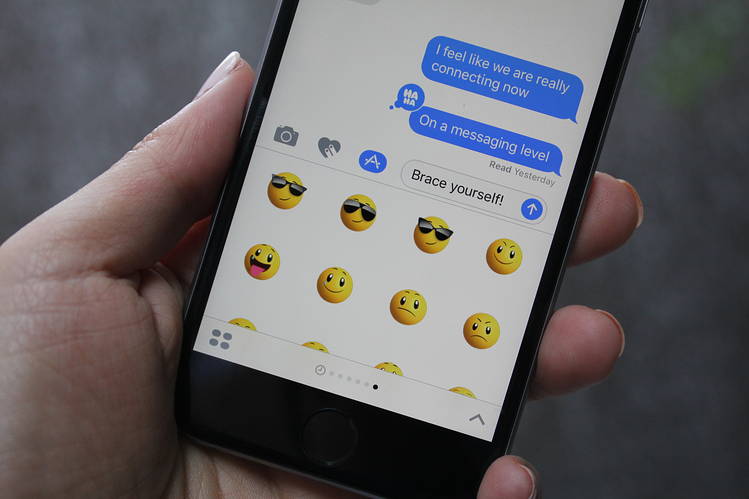
Messages in IOS 10 is enhanced with replaceable and bigger sized emoji. Effects like invisible ink, tap backs, bubble effect, digital ink and stickers are introduced in messages. With the evolution of such eye-catching features, conversations have now become more entertaining.

Emoji in iPhone

The emoji and the effects are collectively adding fame to this new update. Now you can share your stories and happiness adding the touch of expressions in them. If it’s something exciting then add background effect, enhance the text into larger font and then boom!!! It will appear like a celebration. If you wish to give your loved one a cute hidden message then type it with invisible ink, simply rub with a fingertip and the message will appear on the screen leaving a cute memory on the mind. There are four different types of expressions along with this you can tag induvial messages too. Keep pressing the selected message and six options will appear on the screen.

Emoji and new effects

Modified version of Maps

The modified version of Apple Map allows the user to easily pan and zoom to navigate. The navigation software is extraordinarily smooth and it facilitates the users to conveniently check the points of interest.
 
IOS 10 Update Siri

Among the many outstanding features, updated version of Siri is the best of all. Now Siri is available for third parties too. Which means you can send commands to other applications, book rideshare, order a pizza, transfer money to friends or family and many other benefits can be availed.

Parking Assistant

Those days are gone when you have to spot your parked position as parking assistance is here to help you in tracking the place you parked your car at. The specialty of this feature is that it will only inform you about the position when you park at any non-parking spot. This application is connected with Apple Map.

Parking Assistant

Organ Donation Sign Up

What can be best than to saving lives in a day? IOS 10 gives you a chance to save the life by providing you easy access to National Donate Life Registry. Simply sign in and fill the form and help patients by donating your organs. Millions of patients across the globe dies due to insufficient organ supply but now you can play your part in helping them.

Sharing Notes

With IOS 10 you can easily share your notes with your friends. Click the option on the top right corner and select the contact. Whenever you add any new note to your list they will be able to see it. Hence IOS 10 is playing its role in strengthening relationships as it is now easier to deliver your thoughts.

Clicking Pictures while listening to music

I know how disturbing it gets when you are asked to click a picture in a middle of your favorite song. You have to choose between the cameras of your music but now that helplessness is gone as IOS 10 allows users to click pictures while listening to their music. Isn’t it great!

Wake up Alarm clock

Do you want to make IPhone your friend? If so then without wasting any second update your software as it will provide you an IPhone alarm clock assistant. Along with updating many other features IOS 10 has enhanced the alarm clock too. It allows you to have two separate alarm clock one is the ordinary clock and another one is Wake up Alarm clock. This alarm clock guides you about your sleeping hours. It will remind you when you should go to your bed and when you should wake up. In short, it will manage your whole sleeping routine.

Wake up Alarm clock

Mail Application

The mail app is enhanced too. It is now easier to filter messages by just one click. You just have to select the categories and it will get filtered. Along with this, the conversation threads are also managed properly. You will be able to see the full thread in your application.

Two features in Home Button:

IOS 10 has enabled users to have two different features in a single home button. Upon updating you will be asked to press the home button in order to enter the passcode but if one doesn’t feel like using this feature he can switch to previous setting by going to Setting > General > Accessibility > Home Button. Voila! Your previous button is back.

Hence these were some of the amazing features that IOS 10 has introduced but there still are a lot many features which you will discover. So it’s better to be updated then to be outdated.


About Me:
I am a content writer who have the keen interest in technology specifically covering the topics related to Android and IOS App Developing Company. I love to research and have been in this profession for five years. Besides this, I’m preparing myself to become a ghostwriter. I love to read and learn. My area of expertise in writing is related to industries like technology, designing particularly applications and research based work.

Email: Ayesha.Sameen@weatherlycloud.com
URL: https://www.appaustic.com/android-app-development

How to Convert PDF Files without a Desktop Software

In a world where technology reigns supreme, so many things in our lives are simplified by it, but there are some aspects that remain rather complicated. For those of us who deal with it on a daily basis, it’s necessary to have a deep understanding of these technological issues, in order to enhance our knowledge levels and overcome problems with ease, and of course, in as little time as possible.

One of the tech things that often confuse people are PDF files, or more precisely how to edit PDFs. This format is renowned world-wide as a standard for sharing different business documents, because of their capability to be viewed on every operating system and device exactly as they were created, which is a unique value among file formats. For this reason many programs have an option to create a PDF from another file type, thus making it ideal for sending.

But on the other hand, once the PDF is sent to another user, it becomes a read-only file, and the person who received it cannot make any changes to it without the use of specially designed software or online tools, which convert PDFs back to their native state. The software solutions are often expensive, and for people who don’t require this kind of operation frequently, they are fairly unnecessary.

Unlike them, online tools are usually completely free, and there is no significant difference in comparison to software solutions for simple files. Today we’re going to introduce a conversion tool that can handle the three most popular Microsoft Office formats, Excel, PowerPoint and Word, because these files are also mostly used for creating documents and then sending them in PDF.


PDF Converter

PDF Converter’s Free Online PDF Conversion functions by taking three simple steps, and for the sake of the demonstration, in the continuation of the text we will focus on one of these three formats, for instance Excel.


PDF Converter - Select a file

The first step is choosing the PDF file from your hard drive that you want to convert back to Excel.


PDF Converter - Enter your email

The next phase is selecting the email address where you will find the link to the converted file once the process is complete. It’s important to note that your private information will never be used by the company, nor will it be ever sold to someone else.


PDF Converter - Start conversion

The third and final part is clicking on the “Start” button, after which you will find the link in your mail address. It’s all quite simple, and even the non tech-savvy users will have no problem maneuvering this tool.

We sincerely hope you found this information useful, and when the time comes, you will put this tool to good use.

5 Tips to Speed up Your Windows 10 on Old PC

With an increasing number of Windows users upgrading their OS to Windows 10, it is crucial for them to know how to optimize their operating systems. Many users installed or upgraded Windows 10 on their current aged laptops or desktops, which is likely to affect the performance of running Windows 10. Old computers which come with old drive are able to perform Windows 10, yet you may encounter slow running speed especially when you launch some certain programs which with big cache files.

Purchase new PC would be an acceptable solution, but it isn’t suitable for every Windows user. More attention should be paid to optimizing existing PC. Follow these five tips below to speed up your Windows 10 now.

#1. Clean Windows.old folder

You will find a folder named Windows.old in C drive after upgrading. If you confirm that you will use Windows 10 for ever, then delete this folder. Right click C drive and select Properties. Then click Disk Cleanup.

#2. Close Login password

Windows 10 sets up password for system security, nevertheless it prolong desktop loading time. You can change this setting to save loading time. If your PC could be accessed by others, then think twice.

Press Windows key + R at the same time to open Run box. Type netplwiz and hit Enter. Uncheck Users must enter a user name and password to use this computer box, and click Apply. It will ask you to type password in the pop-up window to confirm this operation.


#3. Close IPv6

IPv6 is the abbreviation of Internet Protocol Version 6, which hasn’t been popularized in the world. This protocol started since 2012, but its penetration is less than 30 % after 4 yeas’ development. This is not saying IPv6 is not good enough, but its development is closely linked with state policy. Anyway, to open IPv6 will lengthen the time of connecting network and close it won’t affect the use of network since we still have IPv4.

Go Start -> Control Panel -> Network and Internet -> Network Connections. Double click Ethernet0, click Properties, and then uncheck Internet Protocol Version 6 (TCP/IPv6) box.


#4. Close unnecessary Visual Effects

Visual Effects in Windows 10 could improve user experience, but it is not necessary on PC with old drives. Close it to reduce loading time.

Double click This PC on the desktop, and click System properties -> Advanced system settings -> Settings. Uncheck Fade out menu items after clicking box.


#5. Disable Virtual Memory

To disable Virtual Memory in Windows 10 could reduce reading and writing times to hard disk. Besides, local memory has faster data transfer speed than virtual memory. If your hard drive holds enough capacity, just disable this setting.

Follow the steps in Tip #4 to Settings. Click Advanced next to Visual Effects, and click Change. Then uncheck Automatically manage paging file size for all drives box and pitch on No paging file and click Set.


With these 5 tips, you can speed up your Windows 10 on PC with old drives and running Windows 10 at better experience. Many users also deal with Windows 10 slow speed issue using another solution, upgrade HDD with SSD or new hard drive. But you need to choose the right software while clone boot drive to SSD.

10 Best AI-Powered Websites to Make Money

Introduction Artificial Intelligence (AI) has revolutionized many aspects of our lives, including the way we can earn money online. From aut...